Connexion

Archive
Tous les articlesJuillet 2026Juin 2026Mai 2026Février 2026Janvier 2026Décembre 2025Octobre 2025Septembre 2025Juillet 2025Octobre 2024Juin 2024Février 2024Janvier 2024Novembre 2023Octobre 2023Août 2023Avril 2023Mars 2023Février 2023Janvier 2023Décembre 2022Juillet 2022Mai 2022Mars 2022Décembre 2021Novembre 2021Octobre 2021Septembre 2021Août 2021Juillet 2021Juin 2021Mai 2021Avril 2021Mars 2021Février 2021Janvier 2021Décembre 2020Novembre 2020Octobre 2020Juillet 2020Mai 2020Avril 2020Mars 2020Février 2020Janvier 2020Octobre 2019Septembre 2019Juillet 2019Mars 2019Février 2019Octobre 2018Septembre 2018Août 2018Juillet 2018Juin 2018Mars 2018Février 2018Janvier 2018Décembre 2017Novembre 2017Juillet 2017Juin 2017Avril 2017Février 2017Janvier 2017Août 2016Juin 2016Février 2016Novembre 2015Octobre 2015Septembre 2015Juillet 2015Juin 2015Janvier 2015Novembre 2014Octobre 2014Septembre 2014Août 2014Juillet 2014Juin 2014Mai 2014Avril 2014Février 2014Janvier 2014Octobre 2013Septembre 2013Juillet 2013Février 2013Octobre 2012Septembre 2012Mai 2012Janvier 2012Novembre 2011Juillet 2011Février 2011Janvier 2011Décembre 2010Octobre 2010Avril 2010Février 2010Janvier 2010Septembre 2009Mai 2009Février 2009Janvier 2009Juillet 2008Décembre 2007Septembre 2007Juillet 2007Avril 2007Avril 2006Mars 2006Novembre 2005Mai 2005Octobre 2004Août 2004Juin 2004Mai 2004Avril 2004Mars 2004Décembre 2003Mai 2002Novembre 2000How to Disable the Pre-Feed Card on Value Line and ZXP Series Printers
Zebra Value Line and ZXP Series Printers (ZXP 1 and ZXP 3) has a feature that pre-feed a card into the printer so it's faster to print when a job is sent. The main benefit of this function is to increase printing speed and output. However it create two problems:- When turning the printer On, it will eject the card and pre-feed a new one. So if you turn off the printer at the end of the day and turn it on the next day, it eject a card every time. It's quite annoying after a while.
- When it pre-feed the card, the card stop just under the sticky roller and wait there. If it wait too long, the sticky roller will be so glue to the card that when the printer receive the command to print a card, the motor has problem moving the card and generate a "Mechanical error".
So because of the two problems, we recommend to turn off this pre-feed feature. You can do it by following those steps:
- Go to the Start Menu> Printers and Faxes (Windows XP) or Devices and Printers (Windows 7)
- Right click on your Zebra Card printer and select Properties (Windows XP) or Printer Properties (Windows 7)
- Go to the Device Settings tab
- Click on Tools or For Value line printers, click the Properties button
- In the Command to Send to Printer area, type "+PRF 0" to disable the pre-feed
- Click the Execute button; "ACK" should show under Printer Status to indicate the command was accepted successfully
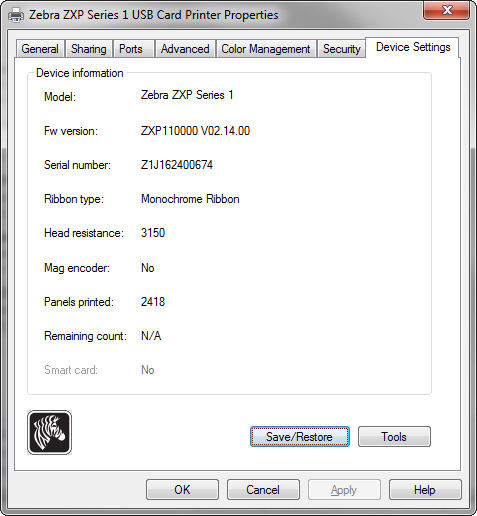
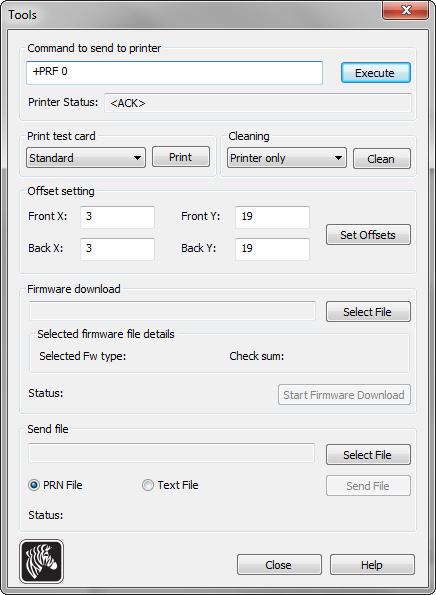
The disabled pre-feed should be in effect. You can confirm after you power-cycle the printer or after sending a print job. You can also type "+PRF 1" to turn it on again!
Tag: pre-feed card, zebra, zxp1, zxp3
Favoris des clients