Connexion

Archive
Tous les articlesJuillet 2026Juin 2026Mai 2026Février 2026Janvier 2026Décembre 2025Octobre 2025Septembre 2025Juillet 2025Octobre 2024Juin 2024Février 2024Janvier 2024Novembre 2023Octobre 2023Août 2023Avril 2023Mars 2023Février 2023Janvier 2023Décembre 2022Juillet 2022Mai 2022Mars 2022Décembre 2021Novembre 2021Octobre 2021Septembre 2021Août 2021Juillet 2021Juin 2021Mai 2021Avril 2021Mars 2021Février 2021Janvier 2021Décembre 2020Novembre 2020Octobre 2020Juillet 2020Mai 2020Avril 2020Mars 2020Février 2020Janvier 2020Octobre 2019Septembre 2019Juillet 2019Mars 2019Février 2019Octobre 2018Septembre 2018Août 2018Juillet 2018Juin 2018Mars 2018Février 2018Janvier 2018Décembre 2017Novembre 2017Juillet 2017Juin 2017Avril 2017Février 2017Janvier 2017Août 2016Juin 2016Février 2016Novembre 2015Octobre 2015Septembre 2015Juillet 2015Juin 2015Janvier 2015Novembre 2014Octobre 2014Septembre 2014Août 2014Juillet 2014Juin 2014Mai 2014Avril 2014Février 2014Janvier 2014Octobre 2013Septembre 2013Juillet 2013Février 2013Octobre 2012Septembre 2012Mai 2012Janvier 2012Novembre 2011Juillet 2011Février 2011Janvier 2011Décembre 2010Octobre 2010Avril 2010Février 2010Janvier 2010Septembre 2009Mai 2009Février 2009Janvier 2009Juillet 2008Décembre 2007Septembre 2007Juillet 2007Avril 2007Avril 2006Mars 2006Novembre 2005Mai 2005Octobre 2004Août 2004Juin 2004Mai 2004Avril 2004Mars 2004Décembre 2003Mai 2002Novembre 2000How to clean the printhead of an Entrust Sigma DS1 or DS2 printer
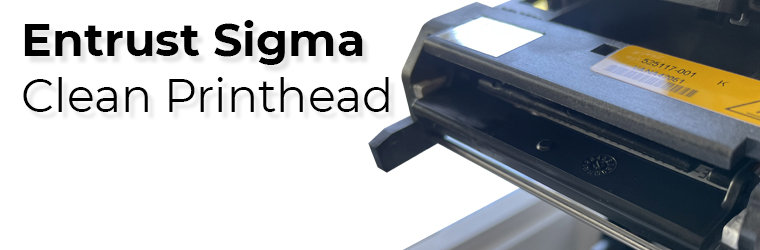
In their great wisdom, Entrust engineers added a printhead protector to all Sigma printer models (DS1, DS2, and DS3) to ensure it stays safe and secure during printing and when servicing the printer. This feature dramatically reduces the risk of damaging the printhead, but it doesn't mean it can't happen. We recommend cleaning the print head after every 2,000 cards the printer processes, or more often, depending on your environment.

When printing ID cards, if you notice a long white line across the design, your print head is either damaged or dirty. First, clean the printhead properly and try again. Do the following to clean the printhead:
Instructions
- Power off the printer.
- Unlock the printer and open the printer cover.
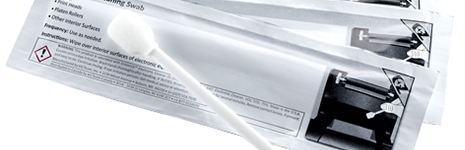
- Open and remove a cleaning swab from its package.
- Lift the printhead protective cover. Use the sides of the cover to rotate it away from the printhead.
- Use gentle pressure to move the cleaning swab back and forth along the full length of the printhead edge until it's spotless.
- Close the printer cover. Press down on the ridges on the front of the cover to ensure it latches completely on both sides.
- Power on the printer.
- Print a sample card or a test card to verify the quality of printing.


HINTS & TIPS
- Avoid touching the printhead edge with your fingers. Contamination due to skin oils can eventually damage the printhead.
- Avoid touching the printing edge of the printhead cartridge with any sharp objects that can permanently damage the printhead.
- Use only the cleaning swab to clean the printhead. Other materials can stick to the printhead and cause damage.
- Use a cleaning swab one time only. Discard it after you clean the printhead.
- Don't use pre-punched cards. When the print head passes over a punch hole in a card, it can scratch and be damaged.
- Do not hit the printhead with plastic parts, your jewelry, rings, watches, etc. This is the most common way of damaging your print head.
If you still see white lines, contact us for more information. It's straightforward to replace the printhead, but it's an expensive part, so be careful.
Tag: entrust, sigma, ds1, ds2, printhead, clean print head
Favoris des clients
Entrust Cleaning Swabs [Pack of 5 swabs]![Entrust Cleaning Swabs [Pack of 5 swabs]](https://cdn.aptika.com/images/products/507377-001-t.jpg "Entrust Cleaning Swabs [Pack of 5 swabs]")
$14.95$17.00

Entrust Sigma 5 Panel Color Ribbon - YMCKT - 500 prints
$195.00$265.00