
 Connexion

Archive
Tous les articlesJuillet 2026Juin 2026Mai 2026Février 2026Janvier 2026Décembre 2025Octobre 2025Septembre 2025Juillet 2025Octobre 2024Juin 2024Février 2024Janvier 2024Novembre 2023Octobre 2023Août 2023Avril 2023Mars 2023Février 2023Janvier 2023Décembre 2022Juillet 2022Mai 2022Mars 2022Décembre 2021Novembre 2021Octobre 2021Septembre 2021Août 2021Juillet 2021Juin 2021Mai 2021Avril 2021Mars 2021Février 2021Janvier 2021Décembre 2020Novembre 2020Octobre 2020Juillet 2020Mai 2020Avril 2020Mars 2020Février 2020Janvier 2020Octobre 2019Septembre 2019Juillet 2019Mars 2019Février 2019Octobre 2018Septembre 2018Août 2018Juillet 2018Juin 2018Mars 2018Février 2018Janvier 2018Décembre 2017Novembre 2017Juillet 2017Juin 2017Avril 2017Février 2017Janvier 2017Août 2016Juin 2016Février 2016Novembre 2015Octobre 2015Septembre 2015Juillet 2015Juin 2015Janvier 2015Novembre 2014Octobre 2014Septembre 2014Août 2014Juillet 2014Juin 2014Mai 2014Avril 2014Février 2014Janvier 2014Octobre 2013Septembre 2013Juillet 2013Février 2013Octobre 2012Septembre 2012Mai 2012Janvier 2012Novembre 2011Juillet 2011Février 2011Janvier 2011Décembre 2010Octobre 2010Avril 2010Février 2010Janvier 2010Septembre 2009Mai 2009Février 2009Janvier 2009Juillet 2008Décembre 2007Septembre 2007Juillet 2007Avril 2007Avril 2006Mars 2006Novembre 2005Mai 2005Octobre 2004Août 2004Juin 2004Mai 2004Avril 2004Mars 2004Décembre 2003Mai 2002Novembre 2000How to use Cleaning Cards with an Entrust Sigma DS1 or DS2 Printer
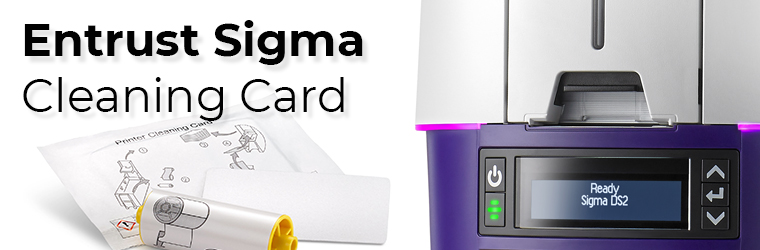
Run a cleaning card each time you change the print ribbon, after every 500 cards processed by the printer if print quality diminishes, or more often, depending on your environment.
The Printer Dashboard displays a count of the number of cards that can be run before the printer should be cleaned. You can change the number of cards printed before cleaning using the Printer Dashboard Print menu. You also can enable an LCD message that requires the printer to be cleaned before continuing to use the Printer Dashboard Behavior menu. Refer to the Printer Dashboard Help for more information.
The following procedure describes how to clean the printer using the LCD panel. You also can select to clean the printer from the Printer Dashboard.
Instructions
- Unlock the printer and input hopper locks, if present.
- Open the printer cover and remove the print ribbon cartridge or cassette.
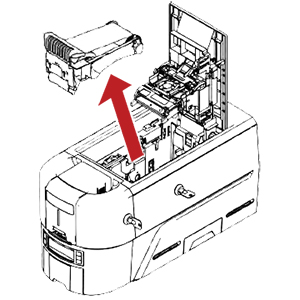
- Close the cover.
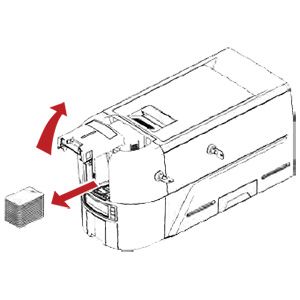
- Open the input hopper cover and remove any unprinted cards. Handle the cards by the edges only, or wear approved card inspection gloves.
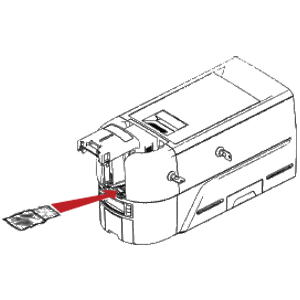
- Load the cleaning card into the input hopper.
- Close and lock the input hopper.
- Continue with "Run the Cleaning Card".
Tag: sigma, entrust, ds1, ds2, cleaning card
Favoris des clients
Entrust Sigma 5 Panel Color Ribbon - YMCKT - 500 prints
$195.00$265.00
Entrust Sigma DS1 - Simplex - 125-Card Input Hopper
$1,879.00$2,615.00
Entrust Sigma DS2 - Duplex - 125-Card Input Hopper
$2,385.00$4,108.00
Entrust Sigma DS2 - Simplex - 125-Card Input Hopper
$2,029.00$3,164.00